
Hey there, tech fam! If you’re gunning for a gig at Google, you know the system design interview is the real beast you gotta slay It ain’t just about coding—it’s about building massive, scalable systems that can handle millions of users without breakin’ a sweat I’ve seen peeps stumble here, but I’m gonna walk ya through how to tackle Google design interview questions with confidence. We’re diving deep into what these interviews are about, the key concepts you gotta know, and some of the most common questions with detailed breakdowns. Let’s get you prepped to impress those interviewers!
Why Google Design Interviews Are a Big Deal
First off, let’s talk about why these interviews matter so much. Google ain’t just lookin’ for someone who can write a quick algorithm. They want engineers who can design systems that power stuff like Google Maps or YouTube—systems that don’t crash when the whole world’s using ‘em at once. These interviews test your ability to think big, solve problems logically, and communicate your ideas clearly. Mess this up, and it’s game over, no matter how good your coding chops are.
So, what’s the deal with system design? It’s all about creating architectures that are:
- Scalable: Can handle crazy amounts of traffic.
- Reliable: Won’t go down when a server fails.
- Efficient: Don’t waste resources or time.
We’re gonna break down how to approach these questions step by step, cover the must-know concepts, and then dig into real examples that Google loves to throw at candidates. Stick with me, and you’ll be ready to roll.
How to Approach Google Design Interview Questions
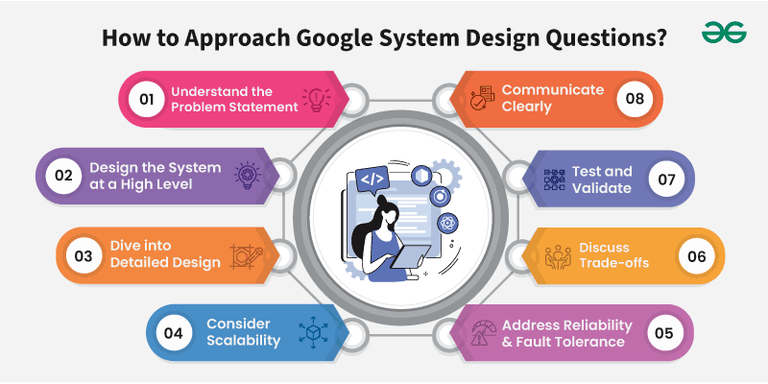
Before we get into specific questions, let’s talk strategy. You can’t just wing it in a Google interview. They expect a structured thought process, and trust me, I’ve seen folks flop hard by jumpin’ straight into details without a plan. Here’s how we tackle these beasts:
Step 1: Understand the Problem
Don’t start drawin’ diagrams right away. Ask questions. What’s the goal of this system? How many users are we talkin’ about? Any specific constraints, like super-low latency? Get crystal clear on the requirements before movin’ on. If they say, “Design a video streaming service,” ask if it’s for live streams or on-demand, and what’s the priority—speed or quality?
Step 2: Sketch a High-Level Design
Once you got the problem nailed down draw a big-picture architecture. Think about the main pieces—clients, servers databases, and how they connect. Keep it simple at first. You’re just layin’ the foundation here, not gettin’ into the nitty-gritty yet.
Step 3: Dive into the Details
Now zoom in. Break each component down. How’s the database gonna store data? What kinda APIs will the services use to talk to each other? Think about how data flows through the system. This is where you show off your technical depth.
Step 4: Handle Scalability
Google’s all about scale. How’s your system gonna handle a million users jumpin’ on at once? Talk about load balancing (spreadin’ traffic across servers), caching (storin’ stuff for quick access), and maybe sharding (splittin’ up data). Show ‘em you can think big.
Step 5: Plan for Failures
Stuff breaks, Servers crash, Networks lag How’s your design gonna keep runnin’ when things go south? Talk about redundancy (havin’ backups) and failover (switchin’ to another server if one dies) Reliability is non-negotiable,
Step 6: Discuss Trade-Offs
There’s no perfect design. Maybe you prioritize speed over consistency, or cost over performance. Be ready to explain why you made certain choices and what you’re givin’ up in return. Google loves when you show you’ve thought this through.
Step 7: Test and Explain
Finally, walk through how you’d test your system. How’s it gonna hold up under heavy load? And explain your design clearly—use diagrams if you can. If the interviewer pushes back, listen and adapt. They wanna see how you think on your feet.
This approach ain’t just a checklist; it’s a mindset. Practice it, and you’ll feel way more confident walkin’ into that interview room.
Key Concepts You Gotta Know
Alright, before we jump into the actual questions, let’s cover some core ideas that pop up in almost every Google design interview. I’m keepin’ this simple, ‘cause we don’t need fancy jargon to get the point across.
- Scalability: This is about makin’ sure your system grows without fallin’ apart. Think addin’ more servers (horizontal scaling) or beefin’ up one server (vertical scaling).
- Load Balancing: Spreads out traffic so no single server gets overwhelmed. It’s like havin’ multiple cashiers at a busy store.
- Caching: Stores frequently used data somewhere fast to access. Imagine keepin’ your favorite snacks on the counter instead of diggin’ through the pantry every time.
- Sharding: Splittin’ up a huge database into smaller chunks across different servers. It’s faster and easier to manage.
- Replication: Keepin’ copies of data on multiple servers. If one goes down, another’s got your back.
- Fault Tolerance: Your system keeps workin’ even if somethin’ fails. Think backup generators at a hospital.
- Consistency: How up-to-date data is across servers. Strong consistency means everyone sees the same thing right away; eventual consistency means it might take a sec.
- Message Queues: Let services talk to each other without waitin’ around. It’s like leavin’ a note for someone instead of callin’ ‘em right now.
Got these down? Good. They’re the buildin’ blocks for any system design question Google throws at ya.
Common Google Design Interview Questions (With Solutions!)
Now for the juicy part—let’s break down some of the most common system design questions Google asks. I’m gonna give ya a detailed look at a few of ‘em, so you can see how to apply the approach we just talked about. We’ll start with the big dogs and work through ‘em one by one.
1. Design Google Maps
This one’s a classic. Google Maps ain’t just a map—it’s a beast of a system that handles location searchin’, route plannin’, and real-time traffic for millions of folks worldwide.
Requirements
- What it does: Search places, show maps, give routes with distance and time, adjust for traffic, and guide turn-by-turn.
- What it needs: Handle tons of users, super-fast responses, and stay up even if servers crash.
Challenges
- Real-time updates for traffic or road closures.
- Scalin’ to support global users, especially durin’ busy times like holidays.
- Keepin’ things runnin’ if a server fails.
My Design Solution
Let’s start high-level. We got users on phones or computers sendin’ requests to servers. Those servers talk to databases for map data and route info, plus pull real-time stuff like traffic. Here’s the breakdown:
- Geolocation Service: Tracks where users are in real time.
- Route Finder: Uses fancy algorithms (like Dijkstra’s, if ya wanna get nerdy) to find the best path.
- Map Renderer: Shows the map on your screen, updatin’ with traffic data.
- API Gateway: Takes user requests and sends ‘em to the right service.
- Load Balancer: Makes sure no server gets slammed by spreadin’ out requests.
For scalability, we’re usin’ caching to store common routes and map pieces—saves time. Shardin’ the database by region means faster lookups for local data. And for reliability, we got backup servers replicatin’ data, so if one dies, another jumps in. Real-time traffic? We pull that through a system that listens for updates constantly and pushes ‘em to users.
Trade-offs? We might sacrifice a tiny bit of accuracy in traffic data for speed—most folks want quick answers over perfect ones. And cost-wise, all these servers ain’t cheap, but Google’s got the cash for it.
This design keeps things fast, reliable, and ready for millions. Test it by throwin’ fake traffic at it—see if it holds up under a holiday rush.
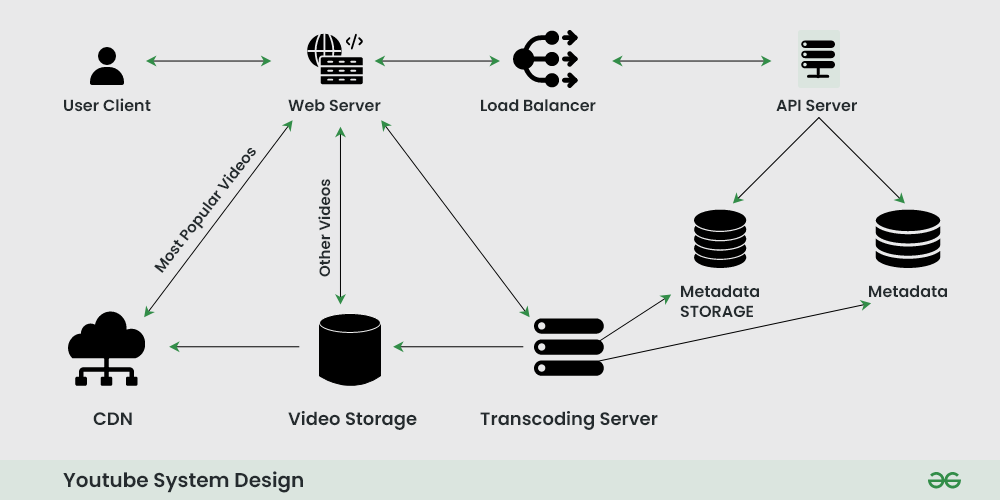
2. Design YouTube’s Video Streaming Service
Next up, let’s build YouTube. Streamin’ videos to millions at once without bufferin’ is no small feat. I’ve thought about this one a lot, ‘cause who don’t love binge-watchin’?
Requirements
- What it does: Upload videos, stream ‘em in different qualities, search for content, suggest vids, and handle comments.
- What it needs: Support tons of viewers, fast playback, and stay up durin’ peak hours.
Challenges
- Streamin’ to millions without lag.
- Storin’ gazillions of videos.
- Adjustin’ quality based on your internet speed.
My Design Solution
High-level, we got users uploadin’ and watchin’ vids through an app or website. Servers handle requests, store videos, and stream ‘em back. Here’s the pieces:
- Content Delivery Network (CDN): Stores video copies close to users for fast loadin’. If you’re in New York, you ain’t pullin’ data from Tokyo.
- Video Encoding Service: Turns uploads into multiple formats—high-def, low-def, whatever your connection can handle.
- Search Service: Finds videos when you type in a query.
- Metadata Storage: Keeps track of video titles, tags, and such in a quick-access database.
- Streaming Service: Sends video in chunks, adjustin’ quality on the fly if your Wi-Fi sucks.
Scalability comes from the CDN—more users, more local servers. We store videos in a distributed system, split across regions. For reliability, replicate data so a server crash don’t kill the party. Trade-off? High-quality vids take more storage and bandwidth, so we might push lower quality to slow connections first.
Test this by simulatin’ a viral video—can the system handle a sudden spike? I’d bet it holds up with this setup.
3. Design a Social Media Platform Like Twitter
Twitter’s another fave of Google interviewers. It’s all about real-time posts, follows, and feeds. Let’s build it, fam.
Requirements
- What it does: Post tweets (text, pics, vids), follow peeps, see a newsfeed of followed accounts, and search tweets.
- What it needs: Handle millions at once, low lag, and stay up no matter what.
Challenges
- Managin’ tons of posts and notifications instantly.
- Buildin’ custom feeds for users with tons of followers.
My Design Solution
Start with the basics: users tweet via an app, servers store posts and build feeds. Here’s how it shakes out:
- Tweet Service: Handles postin’ and likin’ tweets.
- Media Service: Stores pics and vids separate from text for faster loadin’.
- Search Service: Lets ya find tweets by keyword or hashtag.
- Fan-Out System: Pushes new tweets to followers’ feeds right away.
For scale, we split user data across servers by ID or region. Real-time updates use a message system to ping followers instantly. Reliability? Keep copies of data on backup servers. Trade-off here is speed versus storage—pushin’ feeds fast might mean more server space.
Test it with a fake celebrity account—post a tweet and see if millions get it quick. I reckon this design nails it.
4. Design a Ride-Sharing System Like Uber
Last one for now—let’s design a ride-sharin’ app. Matchin’ riders with drivers in real time is tricky, but we got this.
Requirements
- What it does: Match riders to drivers nearby, show ETA, handle routes, and process payments.
- What it needs: Real-time updates, scale for millions, super-low lag.
Challenges
- Matchin’ folks fast based on location.
- Adjustin’ prices durin’ busy times.
My Design Solution
High-level: users request rides via an app, servers match ‘em with drivers, track locations, and handle cash. Key pieces:
- Geospatial Indexin’: Finds nearby drivers usin’ location data.
- Real-Time Trackin’: Updates driver and rider positions constantly.
- Load Balancer: Spreads requests so servers don’t choke.
- Payment Gateway: Secures money transactions.
- Message Queue: Keeps everyone updated on ride status.
Scale by addin’ more servers in busy areas. Reliability with backups for location data. Trade-off? Real-time matchin’ might miss a slightly closer driver for speed. Test with a fake city rush hour—can it match quick? I’m thinkin’ yeah.
Tips to Nail Your Google Design Interview
We’ve covered a bunch, but lemme hit ya with some final tips to seal the deal. I’ve watched buddies ace these interviews by keepin’ a few things in mind:
- Ask Questions First: Don’t assume nothin’. Clarify the scope before divin’ in.
- Break It Down: Split the problem into chunks. Makes it easier to handle.
- Think Scale from the Start: Always design for growth—Google’s obsessed with it.
- Pick the Right Tools: Choose databases or tech that fit the job. Don’t just name-drop stuff.
- Talk Through Trade-Offs: Show you get there’s no one-size-fits-all answer.
- Plan for Failure: Always have a backup plan for when stuff breaks.
- Communicate Clear: Explain your thoughts like you’re talkin’ to a pal. No mumblin’ or over-complicatin’.
Practice these, maybe sketch out designs for fun on a whiteboard or paper. The more you do it, the smoother it gets.
Wrappin’ It Up
Alright, team, we’ve gone deep on Google design interview questions. From the step-by-step approach to key ideas like scalability and fault tolerance, to breakin’ down real questions like Google Maps and YouTube, you’ve got the tools now. It ain’t gonna be easy, but with practice, you can walk into that interview room feelin’ like a boss. Remember, think big, structure your thoughts, and don’t be afraid to ask questions or admit trade-offs. We’re rootin’ for ya to land that Google gig. Go crush it! If you’ve got more questions or wanna dive deeper into one of these designs, hit me up in the comments. Let’s keep this convo goin’!
Q Design YouTube’s Video Streaming Service
- Requirements for Designing YouTubes Video Streaming Service:
- Functional:
- Upload and stream videos in various formats and resolutions.
- Enable search functionality across a large video library.
- Stream videos with minimal buffering.
- Support for features like video recommendations and comments.
- Non-functional:
- Scalability to handle millions of concurrent users.
- Low-latency video playback and uploads.
- Fault tolerance and availability, especially during peak times.
- Functional:
- Challenges for Designing YouTubes Video Streaming Service:
- Concurrent streaming: Supporting millions of users streaming content concurrently, ensuring minimal latency and high-quality playback.
- Efficient video storage: Storing vast amounts of video content and retrieving it quickly.
- Adaptive streaming: Adjusting video quality in real-time based on network conditions.
- Solution for Designing YouTubes Video Streaming Service:
- Use a Content Delivery Network (CDN) to distribute video streams globally, reducing latency.
- Videos are transcoded into multiple formats and resolutions, and the system serves the most appropriate resolution based on the users network conditions (using adaptive bitrate streaming).
- Implement distributed storage systems (e.g., HDFS, S3) to store large volumes of videos.
- Metadata indexing and search systems based on a distributed NoSQL database (e.g., Elasticsearch).
- Key Components for Designing YouTubes Video Streaming Service:
- CDN: Caches video data closer to users to ensure fast delivery.
- Video Encoding Service: Converts videos into multiple formats and bitrates.
- Search Service: Retrieves relevant videos based on user queries.
- Metadata Storage: Stores video details (title, description, etc.) in a NoSQL database.
- Streaming Service: Manages video streaming via adaptive bitrate protocols like HLS or MPEG-DASH.
Further Read: Link
Step Address Reliability and Fault Tolerance
- Redundancy: Plan for redundancy to ensure system availability in case of component failures. Consider strategies like replication and failover.
- Monitoring and Alerts: Implement monitoring to detect and respond to issues. Set up alerts for critical failures or performance degradations.