
Hey there, future DevOps rockstar! If you’re gearin’ up for an AWS DevOps interview, you’ve landed in the right spot. We’re gonna dive deep into what makes AWS such a big deal in the DevOps game, break down some of the most common and tricky interview questions, and toss in a few insider tips to help you shine. I’ve been down this road myself, and trust me, knowin’ what to expect can turn those interview jitters into straight-up confidence. So, let’s get rollin’—no fluff, just the good stuff!
Why AWS Matters in DevOps
Before we jump into the questions, let’s chat about why AWS and DevOps are like peanut butter and jelly AWS, or Amazon Web Services, is the big daddy of cloud computing It’s a powerhouse that gives DevOps folks the tools to automate, scale, and deploy software like a breeze. In a DevOps role, you’re often mixin’ development and operations to speed up delivery, and AWS offers everything from CI/CD pipelines to infrastructure as code (IaC) to make that happen.
Think of AWS as your playground for automation. Whether it’s spinnin’ up servers with a few lines of code or settin’ up auto-scaling for apps, it’s all about makin’ life easier and faster. Companies dig candidates who know their way around AWS ‘cause it saves time cuts costs and keeps things runnin’ smooth. So, if you’re interviewin’ for a DevOps gig, expect AWS to pop up a lot.
Beginner AWS DevOps Interview Questions
Let’s start with the basics. If you’re new to the game or just brushin’ up, these are the kinda questions you might face. I’ll break ‘em down simple, so you get the gist and can answer with confidence.
1. What’s the Role of AWS in DevOps?
AWS is like the Swiss Army knife for DevOps pros. It’s got tools to automate the whole software lifecycle—buildin’, testin’, deployin’, and monitorin’ Key services like AWS CodePipeline and CodeDeploy handle CI/CD workflows, while CloudFormation lets ya define infrastructure as code. Plus, stuff like CloudWatch keeps an eye on everything in real-time Basically, AWS helps ya deliver software faster and with less headaches.
How to Answer: Keep it short and sweet. Say somethin’ like, “AWS supports DevOps by providin’ tools for automation, CI/CD, and monitoring. Services like CodePipeline streamline deployments, and CloudFormation automates infrastructure, makin’ the whole process efficient.”
2. What Are Some Key AWS Services for DevOps?
There’s a bunch, but here’s the core ones you should know:
- AWS CodePipeline: Automates your release process from code to production.
- AWS CodeBuild: Builds and tests your code in the cloud.
- AWS CodeDeploy: Deploys your app to servers or serverless environments.
- AWS CloudFormation: Sets up infrastructure using code, so no manual mess.
- Amazon ECS/EKS: Manages containers for apps, super handy for microservices.
- AWS CloudWatch: Monitors performance and logs, catchin’ issues before they blow up.
How to Answer: List a few services and their purpose. “AWS CodePipeline and CodeBuild handle CI/CD, CloudFormation does infrastructure as code, and CloudWatch is for monitoring. They all tie into makin’ DevOps workflows smoother.”
3. What’s Continuous Integration and Delivery in AWS?
CI/CD is the heart of DevOps, and AWS makes it a snap. Continuous Integration (CI) means regularly mergin’ code changes into a shared repo and testin’ ‘em automatically—think AWS CodeBuild kickin’ in to run builds and tests. Continuous Delivery (CD) takes it further by preppin’ code to go live anytime, often usin’ AWS CodeDeploy to push updates to a staging or production setup.
How to Answer: “CI is about integratin’ code often and testin’ it with tools like AWS CodeBuild. CD ensures code is deployable anytime, usin’ somethin’ like AWS CodeDeploy to roll it out without hiccups.”
4. What’s Infrastructure as Code, and How Does AWS Support It?
Infrastructure as Code, or IaC, is settin’ up your servers, networks, and stuff usin’ scripts instead of clickin’ through dashboards. AWS has CloudFormation for this, lettin’ ya write templates to spin up resources fast and consistent. It’s a game-changer ‘cause you can version-control your setup just like code.
How to Answer: “IaC means managin’ infrastructure with code. AWS CloudFormation lets ya define resources in templates, automatin’ setup and reducin’ errors. It’s all about consistency and speed.”
Intermediate AWS DevOps Interview Questions
Alright, now let’s step it up a notch. If you’ve got some experience or wanna show you’re not just a newbie, these questions dig a bit deeper into how AWS fits into real-world DevOps scenarios.
5. How Do You Set Up a CI/CD Pipeline in AWS?
Settin’ up a CI/CD pipeline in AWS ain’t rocket science, but it takes a few steps. Here’s the lowdown:
- Source Stage: Connect your repo, like GitHub, to AWS CodePipeline. This pulls your code whenever there’s a change.
- Build Stage: Use AWS CodeBuild to compile your app and run tests. It’s like your personal builder in the cloud.
- Deploy Stage: Push the tested code to a staging or production environment with AWS CodeDeploy. You can even do blue-green deployments to avoid downtime.
- Monitor: Tie in CloudWatch to keep tabs on the pipeline and catch any fails quick.
How to Answer: Walk ‘em through it. “I’d use AWS CodePipeline to start, linkin’ it to my GitHub repo. CodeBuild handles buildin’ and testin’, then CodeDeploy pushes it live, maybe with a blue-green setup. CloudWatch monitors the whole thing to spot issues.”
6. What’s Blue-Green Deployment, and How Does AWS Support It?
Blue-Green Deployment is a slick way to release updates without screwin’ things up. You’ve got two environments—Blue (live) and Green (new version). You deploy to Green, test it, then switch traffic over from Blue. If Green flops, switch back. AWS CodeDeploy makes this easy by managin’ the traffic shift for ya, often paired with Elastic Load Balancer (ELB) to route users.
How to Answer: “Blue-Green Deployment uses two setups—Blue is live, Green is the new version. Test Green, then shift traffic with AWS CodeDeploy and ELB. If it fails, roll back to Blue. It cuts downtime and risk.”
7. How Does AWS Handle Auto-Scaling in DevOps?
Auto-scaling is AWS’s way of keepin’ your app runnin’ smooth no matter the load. With Auto Scaling groups, you set rules—like “add a server if CPU hits 70%”—and AWS spins up or shuts down instances automatically. It ties into DevOps by ensurin’ your app scales without manual fuss, often workin’ with ECS for containers or Lambda for serverless.
How to Answer: “AWS Auto Scaling adjusts resources based on demand, like addin’ servers when CPU spikes. It’s key for DevOps ‘cause it keeps apps stable without manual work, integratin’ with ECS or Lambda for flexibility.”
8. What’s the Difference Between ECS and EKS for Container Management?
AWS has two big players for containers—ECS (Elastic Container Service) and EKS (Elastic Kubernetes Service). ECS is simpler, fully managed by AWS, great for basic container setups. EKS is Kubernetes-based, givin’ ya more control and flexibility, but it’s a bit more complex. Choose ECS if ya want easy, EKS if ya need Kubernetes features.
| Service | Best For | Complexity |
|---|---|---|
| AWS ECS | Simple container apps, AWS-native | Low, fully managed |
| AWS EKS | Advanced setups, Kubernetes fans | Higher, more control |
How to Answer: “ECS is AWS’s simpler container service, perfect for straightforward apps. EKS runs Kubernetes, offerin’ more control but with extra setup. I’d pick based on project needs—ECS for quick wins, EKS for complex stuff.”
Advanced AWS DevOps Interview Questions
Now, for the heavy hitters. If you’re aimin’ for a senior role or wanna impress, these questions test your deep know-how on AWS in DevOps workflows. Let’s get technical, but I’ll keep it clear.
9. How Do You Ensure Security in an AWS CI/CD Pipeline?
Security ain’t somethin’ to sleep on in CI/CD. In AWS, ya gotta lock it down at every step:
- IAM Roles: Use least-privilege policies for pipeline access. Don’t give CodePipeline more power than it needs.
- Secrets Management: Store creds and keys in AWS Secrets Manager, not hard-coded in scripts.
- Encryption: Make sure data’s encrypted in transit and at rest—S3 buckets, pipeline artifacts, all of it.
- Scanning: Add security scans in CodeBuild stages to catch vulnerabilities early.
- Audit Trails: Use CloudTrail to log every action for compliance and troubleshootin’.
How to Answer: “I’d secure a CI/CD pipeline with IAM roles for tight access, store secrets in AWS Secrets Manager, and encrypt everything. I’d also run scans in CodeBuild and track actions with CloudTrail to stay compliant.”
10. How Do You Optimize Costs in AWS for DevOps Workflows?
AWS can get pricey if ya ain’t careful. For DevOps, optimization means:
- Right-Sizing: Use tools like AWS Cost Explorer to pick the right instance sizes—don’t overpay for beefy servers ya don’t need.
- Serverless: Go with Lambda or Fargate for workloads that don’t need constant servers. Pay only for what ya use.
- Spot Instances: For non-critical CI/CD builds, use spot instances in CodeBuild to save big.
- Tagging: Tag resources to track costs per project or pipeline, so ya know where money’s goin’.
How to Answer: “To cut costs, I’d right-size instances with Cost Explorer, use serverless options like Lambda, and grab spot instances for builds. Taggin’ resources helps track spendin’ per pipeline too.”
11. What’s Serverless Computing in AWS, and How’s It Fit DevOps?
Serverless is when ya don’t manage servers—AWS does it all. Think AWS Lambda, where ya just upload code, and it runs on demand. In DevOps, it’s dope ‘cause it slashes infrastructure overhead. You can use Lambda for small tasks in CI/CD, like triggerin’ builds or notifications, without spinnin’ up full servers. It’s fast, scalable, and fits automation like a glove.
How to Answer: “Serverless in AWS, like Lambda, means no server management—just run code. It’s great for DevOps, automatin’ small CI/CD tasks without infrastructure hassle, savin’ time and cost.”
Quick Reference: AWS Tools for DevOps
Here’s a handy table to sum up the AWS services ya should know. Keep this in your back pocket for interviews!
| AWS Service | DevOps Use Case | Why It’s Cool |
|---|---|---|
| CodePipeline | Automates CI/CD workflows | Connects source to deployment seamless |
| CodeBuild | Builds and tests code | Scales automatically, no server setup |
| CodeDeploy | Deploys apps to various environments | Supports blue-green, minimal downtime |
| CloudFormation | Infrastructure as Code (IaC) | Automates setups, version-controlled |
| CloudWatch | Monitoring and logging | Real-time alerts, catches issues fast |
| ECS/EKS | Container orchestration | Manages apps at scale, microservices |
| Lambda | Serverless computing | Runs code on demand, cuts infra costs |
My Personal AWS DevOps Interview Story
Lemme tell ya, I remember my first DevOps interview like it was yesterday. I was sweatin’ bullets, thinkin’ I had to know every AWS service under the sun. But here’s the thing—they didn’t grill me on every detail. They asked about CI/CD with CodePipeline, how I’d handle a failed deployment, and if I knew CloudWatch basics. I stumbled a bit on auto-scaling, but ‘cause I was honest and walked ‘em through my thought process, they liked that. Point is, ya don’t gotta be perfect—just show ya can think on your feet and learn quick.
Tips to Crush Your AWS DevOps Interview
Alright, we’ve covered a ton of ground with questions, but let’s wrap with some actionable advice to seal the deal. Here’s how to prep and stand out:
- Hands-On Practice: Don’t just read—do! Set up a free AWS account and mess around with CodePipeline or CloudFormation. Real experience beats book smarts any day.
- Know the Basics Cold: Stuff like CI/CD, IaC, and key services should roll off your tongue. If ya fumble on “What’s CodeBuild?” it’s a red flag.
- Study Real Scenarios: Think about how you’d troubleshoot a pipeline fail or scale an app. Interviewers love when ya can apply knowledge to messy, real-world probs.
- Brush Up on Non-AWS Too: AWS often ties into tools like Jenkins or Docker. Show ya get how they play together.
- Be Honest, Be Curious: If ya don’t know somethin’, say so, but add, “I’d prolly look into CloudWatch logs to figure it out.” Shows ya think like a problem-solver.
- Tailor Your Answers: If the job’s heavy on containers, talk up ECS/EKS. Research the role and flex what matches.
Wrappin’ It Up
There ya have it—a full-on guide to tacklin’ AWS DevOps interview questions with swagger. From the basics of why AWS rocks in DevOps to advanced stuff like securin’ pipelines and goin’ serverless, you’re armed with the know-how to impress. Remember, it ain’t just about memorizin’ answers—it’s about showin’ you can think, adapt, and get stuff done. So, take a deep breath, practice a bit, and go knock that interview outta the park. We’re rootin’ for ya! Got any other AWS DevOps questions or need more tips? Drop a comment, and I’ll hit ya back with more awsome insights!
What is DevOps?
DevOps is a software development approach that combines Development (Dev) and IT Operations (Ops) to automate and streamline the software development, testing, deployment, and maintenance process.
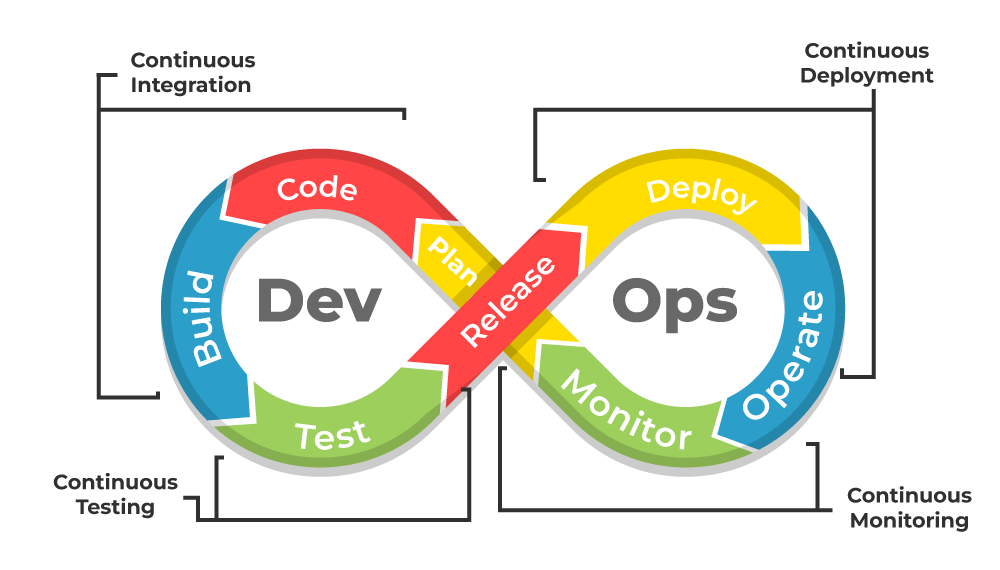
- It focuses on collaboration, automation, and continuous improvement, allowing businesses to deliver software faster, more efficiently, and with fewer errors.
- DevOps integrates Continuous Integration/Continuous Deployment (CI/CD), Infrastructure as Code (IaC), monitoring, and automation to ensure that software is built, tested, and released seamlessly.
4 What is Selenium IDE?
Selenium IDE (Integrated Development Environment) is an open-source web testing solution. Selenium IDE is like a tool that records what you do on a website. Subsequently, these recorded interactions can be replayed as automated tests. You don’t need much programming skills to use it. Even if you’re not great at programming, you can still make simple automated tests with it.
Top 20 AWS DevOps Interview Questions 2025 | AWS DevOps Interview Questions & Answers | Intellipaat
0